

MacBook Pro M3 vs M4 (2026): Which One Should You Buy?
Apple’s M4 MacBook Pro brings meaningful improvements in processing power, memory, connectivity and battery life. But with newer generations now available, the value of older models depends increasingly on price.
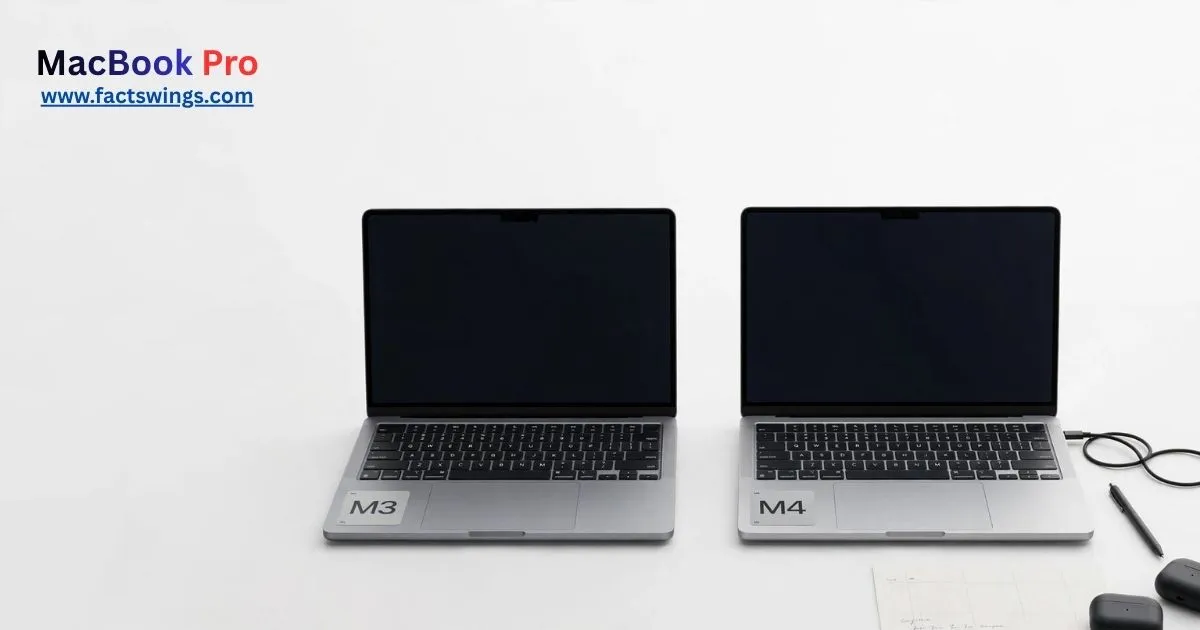
Apple’s MacBook Pro has become an important tool for developers, designers, video editors and other professionals. Its transition to Apple-designed silicon changed the balance between processing performance, battery efficiency and laptop design. The M3 and M4 generations continued that shift, but the differences between them are more important for some buyers than others.
The M3 arrived in 2023, followed by the M4 in 2024. By 2026, neither represents Apple’s newest standard MacBook Pro generation. Yet both remain relevant in the refurbished and used markets, where pricing can make an older machine an attractive purchase.
The decision is not simply about choosing the newer processor. Memory capacity, external display support, battery condition, storage and the price of a newer alternative all influence the value of a MacBook Pro.
Here is how the standard 14-inch MacBook Pro M3 compares with the standard 14-inch M4, and what buyers should consider before spending their money.
The M4’s Biggest Advantage Is Not Just Its Processor
The M4 MacBook Pro introduced a 10-core CPU, compared with the eight-core CPU in the standard M3 model. Both standard configurations have a 10-core GPU and a 16-core Neural Engine.
The M4 also increases memory bandwidth from 100GB/s to 120GB/s. That improvement gives the system more bandwidth when moving data between unified memory and the processor.
For users running demanding applications, these changes can improve performance. But the more practical difference for many buyers is memory.
The original standard M3 configuration started with 8GB of unified memory, while the M4 starts with 16GB. That gives the newer model more room for multitasking and modern applications.
For a laptop expected to remain useful for several years, the difference between 8GB and 16GB can matter more than a modest improvement in CPU speed.
MacBook Pro M3 vs M4: Specifications Compared
The following table highlights the main differences between the standard 14-inch models.
| Specification | MacBook Pro M3 | MacBook Pro M4 |
|---|---|---|
| Launch year | 2023 | 2024 |
| CPU | 8-core | 10-core |
| GPU | 10-core | 10-core |
| Neural Engine | 16-core | 16-core |
| Memory bandwidth | 100GB/s | 120GB/s |
| Starting memory | 8GB | 16GB |
| Display | 14.2-inch Liquid Retina XDR | 14.2-inch Liquid Retina XDR |
| Refresh rate | Up to 120Hz | Up to 120Hz |
| Camera | 1080p FaceTime HD | 12MP Center Stage |
| Thunderbolt ports | 2 Thunderbolt/USB 4 | 3 Thunderbolt 4 |
| Wireless web | Up to 15 hours | Up to 16 hours |
| Video streaming | Up to 22 hours | Up to 24 hours |
Specifications refer to the standard 14-inch models. Battery figures are Apple’s estimates under controlled testing conditions. Actual results vary by configuration and workload.
Performance: How Much Faster Is the M4?
The M4’s 10-core CPU gives it a hardware advantage over the standard M3’s eight-core design. The difference is most relevant in workloads that can use multiple processor cores.
Everyday tasks are less demanding. Browsing, document editing, email, streaming and basic photo editing are already well within the capabilities of the M3.
The M4 becomes more interesting when a computer is expected to handle several demanding tasks at once. Software development, larger creative projects and complex multitasking can benefit from its additional CPU cores and higher memory bandwidth.
For Developers
Both machines can run modern development tools, code editors, local development environments and web browsers. The M4’s additional memory and processing capacity make it the more attractive option for developers who regularly run multiple applications, containers or virtual machines.
However, developers should pay attention to memory configuration. A higher-memory M3 can be more practical than an 8GB base model, particularly when working with large projects.
For Video Editors and Creators
Both processors include media engines designed to accelerate supported video formats, including H.264, HEVC and ProRes.
The M4 is the stronger choice between the two standard models, but professional editors working with complex timelines, high-resolution footage or demanding effects should also consider an M4 Pro or M4 Max configuration.
Display: Similar Foundations, Different Brightness Options
Apple retained the 14.2-inch Liquid Retina XDR display across both generations. The screen has a native resolution of 3024 by 1964 pixels, wide P3 color support and ProMotion technology with refresh rates up to 120Hz.
Both displays are designed for detailed creative work, HDR video and everyday productivity.
The M4 adds an important improvement in outdoor use. Apple lists up to 1,000 nits of SDR brightness outdoors for the M4, compared with 600 nits of SDR brightness on the M3. The M4 also offers an optional nano-texture display.
For people working in bright rooms or near windows, these features can make the newer model more comfortable to use.
The difference is less important for someone who mainly works indoors under controlled lighting.
Memory and Storage: The More Important Buying Decision
The M4’s 16GB starting memory is one of its most practical advantages.
Unified memory is shared across the CPU, GPU and other parts of Apple silicon. Applications, browser tabs and creative workloads all compete for this resource.
An 8GB machine can still handle basic tasks, but heavy multitasking can become restrictive. For a laptop purchased in 2026, 16GB is a more sensible starting point for most professional users.
The standard M3 was available with 8GB or 16GB initially, with higher configurations available. The standard M4 offered 16GB or 24GB initially, with configurations up to 32GB.
Storage also deserves attention. Both generations offered SSD configurations starting at 512GB, with larger capacities available.
For software development, photography and video editing, 512GB may be sufficient for some users, but 1TB provides more flexibility for large files and applications.
Battery Life: A Modest but Useful M4 Improvement
Apple’s published figures give the standard 14-inch M3 up to 22 hours of Apple TV app movie playback and up to 15 hours of wireless web browsing.
The standard M4 is rated for up to 24 hours of video streaming and up to 16 hours of wireless web browsing.
These numbers should not be treated as guaranteed daily battery life. Brightness, applications, background activity, wireless connections and workload can all affect battery consumption.
The M4 has the advantage on Apple’s published estimates. But the condition of a used M3 is especially important.
A battery that has experienced years of charge cycles may deliver considerably less runtime than it did when new. Buyers should inspect battery health and cycle count before purchasing a second-hand machine.
Connectivity: The M4 Offers More Flexibility
The standard M3 MacBook Pro includes two Thunderbolt/USB 4 ports. The M4 moves to three Thunderbolt 4 ports.
Both models include HDMI, an SDXC card slot, MagSafe 3 charging and a 3.5mm headphone jack.
The additional Thunderbolt port can reduce the need for adapters or docking accessories.
External display support is another meaningful difference. The standard M3 supports one external display while its built-in screen is active. It can support a second external display with the laptop lid closed.
The standard M4 supports up to two external displays alongside its built-in screen, subject to Apple’s supported resolution and refresh-rate combinations.
For users with a multi-monitor desk setup, the M4 is the more flexible machine.
Camera and Apple Intelligence
The M3 includes a 1080p FaceTime HD camera. The M4 introduces a 12MP Center Stage camera with Desk View support.
The difference is relevant for people who frequently participate in video meetings, online classes or remote presentations.
Both models support Apple Intelligence. The system includes supported writing tools and other AI-powered features, subject to software, language and regional availability.
The M4’s newer hardware does not mean every Apple Intelligence feature is exclusive to it. Buyers should check the latest macOS requirements before making a decision based on AI capabilities.
Price and Availability: Why the M3 Could Still Make Sense
By 2026, the M3 and M4 are previous-generation products. Their prices are increasingly determined by remaining retail stock, refurbished availability and the condition of second-hand units.
That creates an opportunity for buyers who do not need the newest hardware.
A discounted M3 may deliver excellent value for office work, web development, education and general productivity. The key is finding a configuration with enough memory and a battery in good condition.
The M4 is easier to recommend when the price gap is relatively small. Its higher starting memory, improved connectivity and newer processor provide a more balanced package.
Buyers should also compare both machines with the newer M5 generation now listed in Apple’s MacBook Pro lineup. A heavily discounted M4 may be attractive, but an M5 could offer better long-term value depending on local pricing.
Who Should Buy the M3, and Who Should Choose the M4?
The M3 Is Best for Budget-Conscious Buyers
The M3 remains a reasonable option for buyers who find a substantial discount and do not need the latest features.
- Students handling research, documents and presentations.
- Office workers using productivity applications.
- Developers working on moderate-sized projects.
- Photographers handling everyday editing tasks.
- Buyers who want a premium MacBook at a lower price.
The M4 Is Better for Most Professional Buyers
The M4 is the stronger choice for people who want more memory, improved connectivity and a longer useful life from their purchase.
- Web developers running multiple applications.
- Content creators and photographers.
- Professionals using external monitors.
- People who regularly attend video meetings.
- Users who need more demanding multitasking.
When Should You Consider M5 Instead?
The M5 generation is now part of Apple’s MacBook Pro lineup. For buyers purchasing a brand-new machine in 2026, comparing the M5 against discounted M4 stock is an important step.
If the price difference is small, the newer generation may offer a more sensible long-term purchase. If the M4 is heavily discounted, it can still represent strong value.
The Verdict: M4 Wins, but Price Changes the Decision
The standard M4 MacBook Pro is the better computer in this comparison. It offers a faster CPU, more starting memory, higher memory bandwidth, improved camera hardware, additional Thunderbolt connectivity and better advertised battery life.
The M3’s case is largely economic. At the right price, it remains capable enough for many professional and everyday workloads.
Best overall: MacBook Pro M4.
Best discounted option: MacBook Pro M3 with at least 16GB of unified memory and a healthy battery.
Best new-purchase strategy in 2026: Compare both against the current M5 lineup before deciding.
Frequently Asked Questions
Yes, if its price is competitive with newer models. It offers 16GB of starting memory, strong performance and useful connectivity improvements over the M3.
Yes. The M3 remains capable for everyday productivity, programming and many creative tasks. A 16GB configuration is preferable for most buyers.
Apple rates the standard 14-inch M4 for up to 24 hours of video streaming, compared with up to 22 hours of Apple TV app movie playback for the standard M3.
It can handle basic tasks, but 16GB or more is a better choice for multitasking, development and professional applications in 2026.
Yes. Both generations support Apple Intelligence, subject to supported software versions, languages and regional availability.
The M4 is generally the better choice because of its faster CPU and higher starting memory. However, a 16GB M3 can still handle many web development workflows.
A newer model is worth considering if you want to buy new and the price difference is manageable. Compare the current M5 lineup, specifications and local prices before deciding.
Sources and Editorial Notes
This comparison is based primarily on Apple’s published technical specifications and product documentation. Manufacturer battery estimates are identified as such. Performance conclusions are based on hardware differences rather than invented benchmark scores.
-
Apple — MacBook Pro M3 Technical Specifications
Read Apple’s official M3 specifications -
Apple — MacBook Pro M4 Technical Specifications
Read Apple’s official M4 specifications -
Apple — Compare MacBook Pro Models
Compare the current MacBook Pro lineup
Editorial methodology: Specifications are based on official Apple documentation. Prices, availability and refurbished stock vary by market. Battery performance varies with configuration and usage. This article is an independent editorial comparison and is not sponsored by or affiliated with Apple.
More From FactsWings
Explore more technology reporting, product guides and digital innovation coverage on FactsWings Technology Articles.
Related Articles

Visit the FactsWings homepage for the latest coverage of AI, technology and cybersecurity.